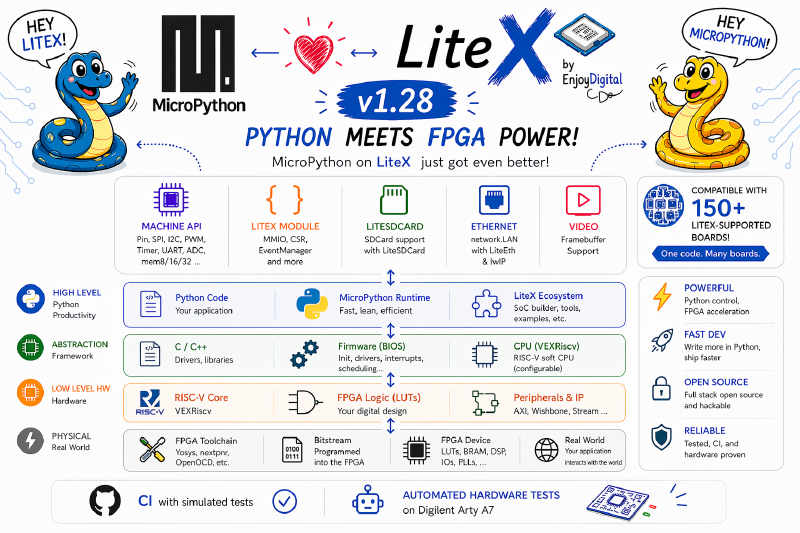
TL;DR: with LiteX you describe an FPGA SoC in Python, and with this port you then run Python on the softcore you just built. It started years ago as Fupy with the LiteX and TimVideos.us communities, we extended it at Enjoy-Digital, and it was recently rebased onto upstream MicroPython 1.28 with networking, SD and SPI-flash storage. The same scripts run across 150+ LiteX boards.
Python at both ends#
This is the one that makes me smile every time. With LiteX you describe your SoC in Python: pick a
CPU, add a UART, some GPIO, Ethernet, a framebuffer, and out comes a bitstream. With this port you
then drop a MicroPython REPL on the very CPU you just defined, and drive that same hardware from
Python. The script that prints hello world can also toggle a pin, pull a DHCP lease off Gigabit
Ethernet, or mount a FatFs filesystem off an SD card.
Put plainly: you describe the hardware in Python, and then you run Python software on it. The same language to build the SoC and to drive it, with everything in between generated for you.
The whole stack, in one V#
If you lay the layers out, it looks like a V. Down the left side you start from a Python description and LiteX turns it into HDL, then synthesis and place-and-route turn that into gates. At the bottom is the FPGA fabric. Up the right side the softcore comes to life, runs a bit of assembly and a C runtime, and at the top you are back in Python, typing at a REPL.
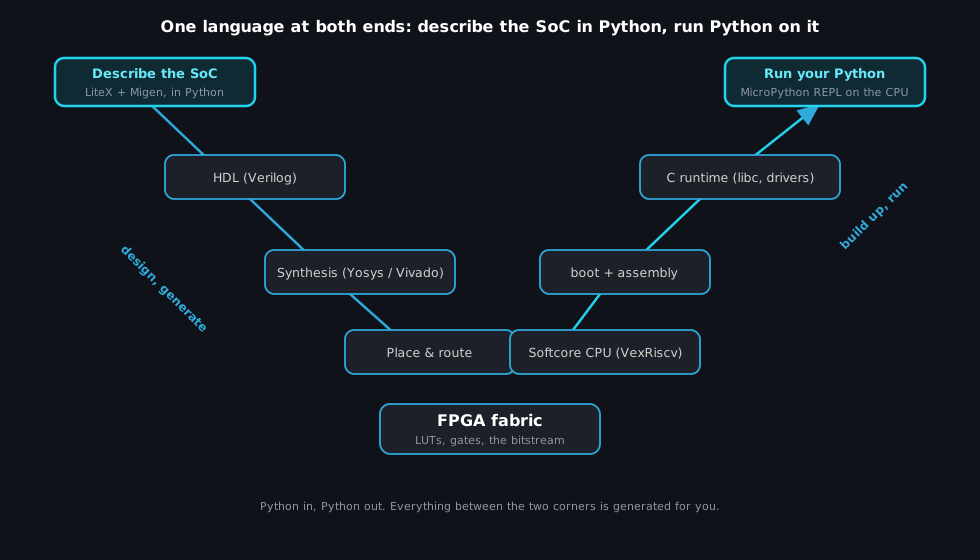
The nice thing is that you can stop at any layer when something is wrong: read a CSR from Python, drop to C, look at the generated Verilog, check the timing report. It is the same design, seen from different heights.
Where it came from#
This port has history. It began as Fupy, put together with the LiteX community and members of TimVideos.us, the same group behind the HDMI2USB project. The early contributors are the TimVideos crowd: Tim “mithro” Ansell, Joel Stanley, William D. Jones, Ewen McNeill, and later Victor Suarez Rovere, whose work on it Enjoy-Digital funded for a client. We picked it up at Enjoy-Digital, extended the hardware coverage, and improved the overall support.
(A note on Tim “mithro” Ansell, who was an important early help to LiteX: he has since gone deep into open-source silicon, the open ASIC flow and SkyWater’s open PDK and the Open MPW shuttles, and more recently wafer.space, his community chip-fabrication service. A nice thread to follow, from a cheap-FPGA Python port to making custom chips accessible.)
Then it sat. For a few years it stayed pinned to MicroPython 1.16 from 2021, working but drifting further and further from upstream (which had moved on by about four and a half years). It kept doing its job, so there was never quite a reason to spend the weeks it would have taken to drag it forward by hand.
Bringing it up to date#
That is the part that changed recently, and it is why this note exists now. With an agent doing the
mechanical heavy lifting, the rebase that had felt like a multi-week slog became approachable. The
port now tracks upstream MicroPython 1.28, on a clean litex-rebase branch. The first thing
that went in was not a feature but a feedback loop: a litex_sim (Verilator) harness with a PTY,
so a change can be tested against a simulated SoC in seconds, plus CI. With that in place, the
four-and-a-half-year jump and a batch of new features were a series of small, checkable steps
rather than one scary leap. (That is the same methodology from the
AI-era post, applied to a software port instead of gateware.)
What you get today#
The port is in good shape. A familiar machine module shows up, and the peripheral classes appear
automatically based on which cores your SoC was built with:
machine.Pin,SPI/SoftSPI,I2C/SoftI2C,PWM,Timer,UART,ADC,WDT.- A
litexmodule for what is specific to LiteX: build metadata, CSR access by name, anEventManagerthat turns peripheral interrupts into Python callbacks, plusLED,DMAand a zero-copyVideoframebuffer. - Networking:
network.LAN(0)over LiteEth and lwIP, with DHCP, DNS and normal sockets. This is one of the recent additions. - Storage: FatFs over an SD card (
machine.SDCard()on the LiteSDCard core), or over on-board Quad-SPI flash (litex.SPIFlash()), also recent.
In practice it reads like ordinary MicroPython:
import network, socket

lan = network.LAN(0)        # LiteEth + lwIP
lan.active(True)
lan.ifconfig("dhcp")        # get a lease
print(lan.ifconfig())       # ('192.168.1.50', '255.255.255.0', '192.168.1.1', '8.8.8.8')
import litex
print(litex.info()) # SoC build metadata
litex.LED(0).on() # drive an LED
v = litex.csr_read("ctrl_scratch") # read any CSR, by nameOne capability worth calling out, because it surprised me how clean it turned out: hardware
interrupts can land directly in Python. litex.EventManager wires a peripheral’s event registers
to a callback, so a timer tick or a GPIO edge can fire a def you wrote, dispatched safely through
MicroPython’s scheduler (mp_sched_schedule):
import litex

def on_tick(em):
    litex.LED(0).toggle()       # runs from the timer IRQ, in Python

em = litex.EventManager("timer0")
em.callback(on_tick)
em.enable()
Interrupt handlers written in Python, running on a RISC-V softcore you also described in Python, is a slightly absurd sentence that happens to be true. 🙂
Your .py files are portable across all 150+ LiteX-supported boards, because the peripheral
classes are gated on whether the SoC has the matching core. The firmware binary is rebuilt per SoC
(CSR addresses are baked in at compile time), but that is one make against the generated headers,
and the API you write against is identical everywhere. It is tested in CI under Verilator-simulated
SoCs, with an end-to-end hardware loop on a Digilent Arty A7.
Why I like it, and where it can go#
Beyond the obvious pleasure of Python-all-the-way-down, a scripting layer on the FPGA is genuinely useful. A lot of FPGA work is not the datapath, it is the control and status around it: bring a peripheral up, poke a register, watch a counter, sequence a power-up, run a quick acceptance test. Doing that from an interactive REPL on the board itself, instead of rebuilding gateware or writing C each time, is a real shortcut. You can keep the heavy lifting in hardware and put the flexible, changes-every-day logic in a Python script you edit in place.
There is a nice continuity with how LiteX is already used. The framework ships a
host bridge:
you run litex_server and drive the SoC from Python on your laptop, over Etherbone, PCIe or UART.
That is the standard way to bring up and test peripherals, and those scripts are already Python.
With MicroPython on the board you can take essentially the same scripts and embed them in the
hardware, and now it is a standalone system, with no host and no C to write. For a lot of products
that is exactly the right shape: the FPGA handles the real-time work, and the software just
configures it, reads status, and makes the decisions that do not need microsecond timing.
That split is the real payoff. Because LiteX lets you push the hard, timing-critical parts down into gateware, you can sit a slow and flexible software stack on top without paying for it where it matters. Deterministic logic in the fabric, plus easy Python above it, lets you tackle things that are still genuinely hard on even a fast microcontroller, where you would be fighting for that determinism the whole way.
I keep imagining things to hang off it: a board that exposes its own control panel as a few Python functions, production test scripts that live next to the board, glue logic that would be silly to bake into gateware, a REPL you SSH into to debug a deployed system.
MicroPython or mquickjs?#
If you read the mquickjs on LiteX post, this will feel related, and it
is: both put a high-level scripting language on a LiteX softcore. The difference is in intent.
mquickjs is small and self-contained, a JavaScript engine I ran bare-metal for the fun of framebuffer
demos and a browser editor served from the board. MicroPython is the full environment: the machine
and network modules, a filesystem, an interactive REPL, and a port that is portable across 150+
boards and tested in CI. One is a focused, delightful demo; the other is the Swiss-army-knife you
reach for when you actually want to live on the board. It is nice that LiteX makes room for both. 🙂
Try it#
The port lives on the litex-rebase branch:
github.com/litex-hub/micropython/tree/litex-rebase/ports/litex.
The README walks through building against a LiteX SoC (including a litex_sim target, so you can
try it with no hardware) and running the examples.
Built on LiteX and MicroPython. Originally Fupy, with the LiteX and TimVideos.us communities.
Work and ideas by Enjoy-Digital and the contributors above; written up with AI in the loop.