
TL;DR: LiteX now ships an MCP server, litex_mcp, that
exposes the bench tools as typed functions. Measured over 132 agent runs, an agent with a shell
does not need it: it uses the same LiteX command-line tools directly. An agent with no shell and
only litex_mcp solves the same problems, on a real board too, for the same cost, and Haiku does
it for about a fifteenth of the cost. Delegating the bench from Opus to Haiku worked, but saved
nothing yet: the bench was never where the money went.
From commands to tools#
The previous post described the loop: write the design, simulate, build, load, test over a bridge, probe with LiteScope, fix, repeat. LiteX was always text and commands, so an agent can run all of it from a shell, and it does, every day.
Watching agents do it for months also shows where they lose time. Most LiteX tools print text made
for a human. Interactive tools like litex_term are a place where a command quietly never
returns. Builds take minutes and eat the agent’s command timeout. And with several litex_server
instances, boards and simulations around, it is easy to read registers on the wrong SoC and draw
confident conclusions from them. 🙂
MCP (Model Context Protocol) is the standard way to give an agent tools: the server describes each tool with a typed signature and a docstring, the agent calls it and gets structured data back. Claude Code, Codex and most other agents and chat clients speak it. So the obvious step was to expose the LiteX tools that way, and then to measure whether it helps.
What is in LiteX now#
litex_mcp lives in LiteX itself (litex/tools/litex_mcp.py), next to litex_server,
litex_cli and litex_term: no version drift with RemoteClient and the CSR files, the same CI,
the same release. The MCP SDK is an optional dependency, imported only when the server runs.
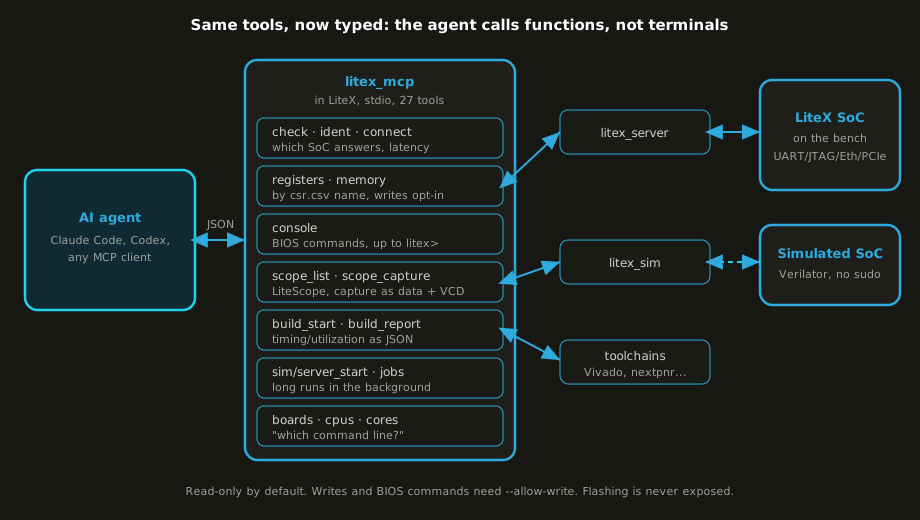
| Group | Tools | What the agent gets |
|---|---|---|
| Link | litex_check, litex_ident, litex_connect | which SoC answers, its identifier, the read round-trip, whether writes are allowed |
| CSRs and memory | litex_list_registers, litex_read_register(s), litex_read_memory, litex_write_* | registers by their csr.csv name, values in decimal and hex, memory as 32-bit words |
| Console | litex_console_read, litex_console_command | BIOS commands over the crossover UART, output up to the litex> prompt |
| LiteScope | litex_scope_list, litex_scope_capture | triggers, arm, wait with a timeout, and the capture as data: value at trigger, transitions, first changes, plus a VCD |
| Builds | litex_build_start, litex_build_report | a build as a background job, then timing met or not, WNS/TNS, per clock Fmax, worst paths, utilization, errors |
| Simulation and jobs | litex_sim_start, litex_server_start, litex_job_wait/status/stop | long runs in the background, wait for a regex in the log |
| Introspection | litex_list_boards, litex_board_info, litex_list_cpus, litex_list_cores | “which command line for this board, this CPU, these cores” without reading 250 target files |
The server is read-only by default. Writes, --load and BIOS commands need it to be started with
--allow-write, and flashing is never exposed. The first call is litex_check, which returns the
identifier of the SoC that answers, and that removes the “wrong board” class of mistakes. Nothing
blocks: builds, simulations and servers are background jobs, and a LiteScope trigger that never
fires returns triggered: false after a timeout. Results are data: a build report is a dict, not
4000 lines of nextpnr output.
Getting started, once a board or a simulation is behind a litex_server:
litex_server --uart --uart-port=/dev/ttyUSB1          # or --jtag, --udp, --pcie...
claude mcp add litex -- litex_mcp --csr-csv=build/<board>/csr.csv
What a real board taught it#
Everything had been developed against simulations, so the first real test was an ECPIX-5 on the
bench (Lattice ECP5-85F, DDR3, the board that got SATA on the ECP5), the
open toolchain, and an agent talking to the board only through litex_mcp: build, bridge, link
check, registers, a reboot that returns the whole boot log, DDR3 writes and reads, a LiteScope
capture on the CPU data bus. 19 tool calls, no terminal.
That clean run was the second attempt. The first found four problems the simulations never had:
errors reaching the agent without their reason, a reboot that killed the UART bridge, a
litex_server with nothing to wait on, a register filter that wanted a regex. All small, all
fixed the same morning (litex#2743).
Measuring it#
Whether it helps is a different question, so I wrote a small agent evaluation suite (litex_agent_eval): debugging tasks on a running SoC, each with a symptom-only prompt, a hidden checker that the agent cannot read, and a reference solution. Every run is a headless Claude Code session in a fresh workspace. 132 runs so far, in four rounds, and each round changed what I thought. The tasks, the runner and the per-run numbers are public.
The first round planted bugs in the SoC sources, and the agent found every one by reading
target.py before running anything: ten out of ten, with or without MCP. The second used bugs
that cannot be read: an anonymous netlist with a stale datasheet, a packer losing packets under
back-pressure, a prebuilt firmware, a register map for another CSR width. 32 out of 32 passed, from
the shell, and the MCP was used in one run out of sixteen.
The third round took the choice away. Same tasks plus the scaler on the ECPIX-5, the SoC already
running before each run (simulated, or loaded into the board’s SRAM) with a litex_server in
front, and two agents: one with a shell and no MCP, one with litex_mcp and file editing, and no
shell at all.
| Task (passes, mean cost) | Opus, shell | Opus, MCP only | Sonnet, MCP only | Haiku, shell | Haiku, MCP only |
|---|---|---|---|---|---|
| Scaler IP, netlist and stale datasheet | 3/3, $0.46 | 3/3, $0.51 | 1/1, $0.15 | 1/2, $0.05 | 2/2, $0.03 |
| Packer losing packets under back-pressure | 3/3, $0.41 | 3/3, $0.34 | |||
| Prebuilt firmware, ADC channel in the wrong bits | 3/3, $0.44 | 3/3, $0.54 | 1/1, $0.14 | 2/2, $0.03 | 1/2, $0.03 |
| Register map for the wrong CSR width | 3/3, $0.14 | 3/3, $0.29 | 2/2, $0.01 | 2/2, $0.02 | |
| Scaler IP on the ECPIX-5 board | 2/2, $0.49 | 2/2, $0.45 | 1/1, $0.22 | 0/2, $0.04 | 2/2, $0.06 |
(Opus, Sonnet and Haiku are Claude Opus 5.5, Sonnet 5.5 and Haiku 5.5.)
For the two larger models, everything passed, and that is the first result. With nothing but the MCP, the agent did the whole job, on the board too: it read the IP’s ID register, noticed a revision the datasheet does not describe, swept the gain and the “reserved” register with a few dozen reads and writes, found that the gain format had changed and that the reserved register was an output limit, fixed the driver, and checked the fix with the same writes.
Haiku is where I nearly told a nicer story than the data. In the third round it did better with only the MCP, 7 of 8 against 5 of 8. In the fourth, Haiku with a shell passed 8 of 8. Over both rounds it was 13 of 16 each way. The tools do not make the small model smarter, but it solves most of these tasks either way, for a few cents a run against forty to fifty for Opus.
The MCP-only runs were often faster, but only because they checked a handful of registers while
the shell agents ran the real host application over a slow UART bridge. They also needed up to six
times more turns, one register per call. (One gap the round found, litex_build_start always
adding --build, is fixed.)
One call instead of sixty#
Those turns are the clearest weakness: each model round-trip costs seconds and re-sends the
context, while the register access itself costs 16 ms over UART. So litex_mcp now has
litex_register_sequence: a list of writes, reads, polls and waits run in one call, optionally
repeated over a sweep, with the results returned as one table. On the ECPIX-5, eight scaler
configurations, each with six writes, a status poll and a read, are one call: 64 bus operations in
half a second.
In the fourth round, Opus with only the MCP used it in six of eight runs without being told. On the board task, MCP calls per run went from 34 to 6 and turns from 43 to 14; on the simulated scaler, from 43 calls to 8. The cost moved less than the turns. The win is in time and in the shape of the request: a sequence is a precise, reviewable piece of work, and it can run without a model in the loop at all.
Who actually needs it#
Put together, the picture is simpler than I expected.
A strong model with a shell does not need litex_mcp. It will find the LiteX command line, write
a ten-line script around RemoteClient, and be done. What helped those agents was making the
command-line tools themselves agent-friendly: JSON output, timeouts instead of hangs, a scripted
mode for litex_term (litex#2748) so a console
check is one command instead of a polling loop the agent writes itself. None of that needs MCP.
An agent without a shell is the case MCP is for, and there it is not a reduced mode: same pass rate, same cost, simulation and hardware. That covers more situations than it sounds: a chat or desktop client where there is no shell, a lab where you do not want an agent running arbitrary commands next to boards and flash chips, a board on a shared bench that several people and agents use. The MCP server is then the whole contract: read-only unless you say otherwise, never able to flash, every action a typed call you can log and replay.
Splitting the work#
Haiku is the agent I would want to hand the bench to: cheap, narrow, and limited by an MCP server that decides what it may touch. That suggests the setup I actually wanted to use.
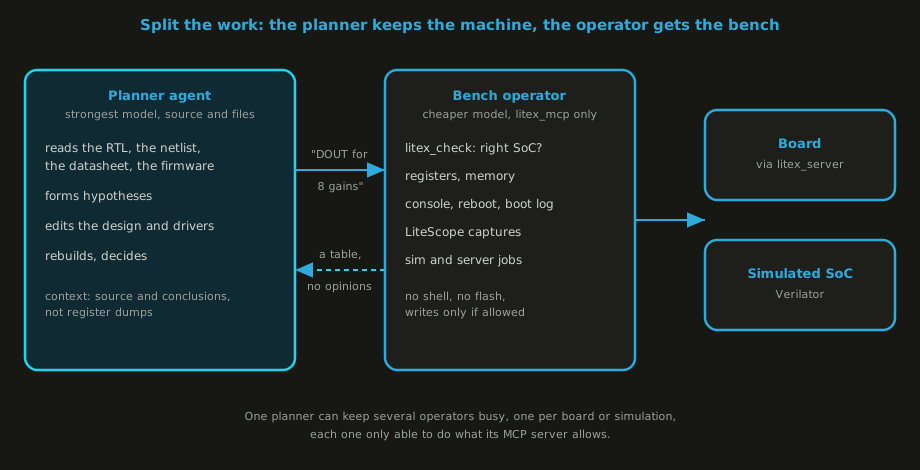
The strong model is the planner: it reads the RTL, the netlist, the datasheet, the firmware, forms
the hypothesis, edits the design and decides. What it should not do is spend its context and its
turns on forty register reads. That goes to a bench operator: a cheaper agent whose only tools are
litex_mcp, with a request like “configure the scaler with these eight gains, feed these inputs,
give me a table of DOUT and STATUS”. The MCP server defines exactly what the operator can do.
So the fourth round measured it. Opus as the planner, with the files and no shell, so that it had
no way to reach the bench itself. Haiku as a bench-operator subagent with only litex_mcp. And a
hook in Claude Code that refuses any MCP call not made by the operator, so the split is enforced,
not just suggested in the prompt.
The hand-over itself worked better than I expected. Opus wrote requests like a good engineer at a bench: which registers to write, which status bit to poll, which values to read back, for these six configurations. Haiku answered with tables, and with no opinions, as told. The planner never tried to go around the operator. Seven of eight runs passed.
What it did not do is save money. The operator cost between a third of a cent and eight cents per run, and the planner was 96% of the bill: $0.51 per run on average, against $0.42 for Opus alone with the MCP. On these tasks the expensive part is reading the sources and thinking, and that stays with the planner by design. The runs were also slower, since the planner sat idle while the operator worked. The one failure was the planner’s own: it needed to disassemble the firmware and had no shell to do it.
So the split is not a cost trick at this scale. It is still the right shape for what I care about: an expensive model that never touches a board, a cheap one that can only do what the MCP server allows, and a log of every typed call in between.
What is next#
It should start paying when the bench work dominates: long captures, sweeps over hours, several boards at once, one operator each. That is the next round, with the planner given a sandboxed shell for offline work (objdump, scripts) that cannot reach the bench. Then sessions over Etherbone and PCIe, and the scenario I am most curious about: DDR calibration fails on a board, find out why. The suite is public, so anyone can rerun it, and as models change, so will the answer.
LiteX: github.com/enjoy-digital/litex, with
litex_mcp. The evaluation: litex_agent_eval.
The LiteX for AI agents
page and Debug a SoC on hardware.
Work and ideas by Enjoy-Digital; written up with AI in the loop.